
အုပ်စုများ
OpenClaw သည် မျက်နှာပြင်များအနှံ့ရှိ အုပ်စုချတ်များကို တစ်သမတ်တည်း ကိုင်တွယ်ဆောင်ရွက်သည် — WhatsApp, Telegram, Discord, Slack, Signal, iMessage, Microsoft Teams။
စတင်သူအတွက် အကျဉ်းချုပ် (၂ မိနစ်)
OpenClaw သည် သင့်ကိုယ်ပိုင် messaging အကောင့်များပေါ်တွင် တိုက်ရိုက် အလုပ်လုပ်ပါသည်။ သီးခြား WhatsApp bot user မရှိပါ။ If you are in a group, OpenClaw can see that group and respond there.
မူလအပြုအမူ (Default behavior) —
- အုပ်စုများကို ကန့်သတ်ထားပါသည် (
groupPolicy: "allowlist")။ - သင်က mention gating ကို တိတိကျကျ မပိတ်ထားသရွေ့ ပြန်ကြားမှုများအတွက် mention လိုအပ်ပါသည်။
ဘာသာပြန်ဆိုလိုသည်မှာ — ခွင့်ပြုစာရင်းထဲရှိ ပို့သူများက OpenClaw ကို mention လုပ်ခြင်းဖြင့်သာ လှုံ့ဆော်နိုင်သည်။
TL;DR
- DM ဝင်ရောက်ခွင့် ကို
*.allowFromဖြင့် ထိန်းချုပ်ပါသည်။- အုပ်စု ဝင်ရောက်ခွင့် ကို
*.groupPolicy+ ခွင့်ပြုစာရင်းများ (*.groups,*.groupAllowFrom) ဖြင့် ထိန်းချုပ်ပါသည်။- ပြန်ကြားမှု လှုံ့ဆော်ခြင်း ကို mention gating (
requireMention,/activation) ဖြင့် ထိန်းချုပ်ပါသည်။
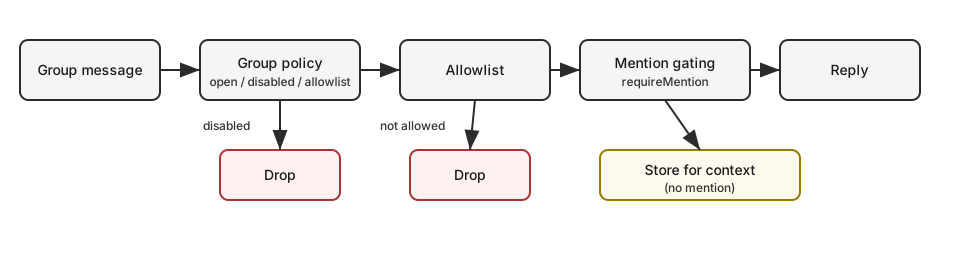
အမြန်လမ်းကြောင်း (အုပ်စုမက်ဆေ့ချ်တစ်ခုတွင် ဖြစ်ပျက်ပုံ) —
groupPolicy? disabled -> drop
groupPolicy? allowlist -> group allowed? no -> drop
requireMention? yes -> mentioned? no -> store for context only
otherwise -> reply
သင် လိုချင်ပါက —
| ရည်ရွယ်ချက် | ချိန်ညှိရမည့်အရာ |
|---|---|
| အုပ်စုအားလုံးကို ခွင့်ပြုပေမယ့် @mention လုပ်မှသာ ပြန်ကြားစေလိုပါက | groups: { "*": { requireMention: true } } |
| အုပ်စုအားလုံးတွင် ပြန်ကြားမှု ပိတ်လိုပါက | groupPolicy: "disabled" |
| အုပ်စု သတ်မှတ်ချက်အချို့သာ ခွင့်ပြုလိုပါက | groups: { "<group-id>": { ... } } (no "*" key) |
| အုပ်စုတွင် သင်သာ လှုံ့ဆော်နိုင်စေရန် | groupPolicy: "allowlist", groupAllowFrom: ["+1555..."] |
ဆက်ရှင် ကီးများ
- အုပ်စု ဆက်ရှင်များသည်
agent:<agentId>:<channel>:group:<id>ဆက်ရှင် ကီးများကို အသုံးပြုသည် (rooms/ချန်နယ်များမှာagent:<agentId>:<channel>:channel:<id>ကို အသုံးပြုသည်)။ - Telegram forum topics များတွင် အုပ်စု ID သို့
:topic:<threadId>ကို ထပ်ပေါင်းထားပြီး topic တစ်ခုစီအတွက် ကိုယ်ပိုင် ဆက်ရှင် ရရှိစေသည်။ - တိုက်ရိုက် ချတ်များ (Direct chats) သည် အဓိက ဆက်ရှင်ကို အသုံးပြုသည် (သို့မဟုတ် စီစဉ်ထားပါက ပို့သူတစ်ဦးချင်းစီအလိုက်)။
- Heartbeats များကို အုပ်စု ဆက်ရှင်များတွင် ကျော်လွှားထားပါသည်။
ပုံစံ: ကိုယ်ရေးကိုယ်တာ DMs + အများပြည်သူ အုပ်စုများ (အေးဂျင့်တစ်ခုတည်း)
ဟုတ်ပါတယ် — သင့် “ကိုယ်ရေးကိုယ်တာ” လှုပ်ရှားမှုများသည် DMs ဖြစ်ပြီး “အများပြည်သူ” လှုပ်ရှားမှုများသည် အုပ်စုများ ဖြစ်ပါက ဤပုံစံသည် ကောင်းစွာ အလုပ်လုပ်ပါသည်။
ဘာကြောင့်လဲဆိုတော့ single-agent mode တွင် DM များသည် ပုံမှန်အားဖြင့် main session key (agent:main:main) ထဲသို့ ရောက်ရှိတတ်ပြီး၊ group များသည် အမြဲတမ်း non-main session key များ (agent:main:<channel>:group:<id>) ကို အသုံးပြုပါသည်။ mode: "non-main" ဖြင့် sandboxing ကို ဖွင့်ထားပါက၊ ထို group session များသည် Docker ထဲတွင် လည်ပတ်မည်ဖြစ်ပြီး သင့်၏ main DM session သည် host ပေါ်တွင် ဆက်လက် ရှိနေမည်ဖြစ်သည်။
ဤအရာကြောင့် အေးဂျင့် “ဦးနှောက်” တစ်ခု (မျှဝေထားသော workspace + မှတ်ဉာဏ်) ကို အသုံးပြုနိုင်ပြီး လုပ်ဆောင်မှု အနေအထား နှစ်မျိုး ရရှိပါသည် —
- DMs: ကိရိယာ အပြည့်အစုံ (ဟို့စ်)
- အုပ်စုများ: sandbox + ကန့်သတ်ထားသော ကိရိယာများ (Docker)
အမှန်တကယ် သီးခြား workspace/persona များ (“personal” နှင့် “public” ကို လုံးဝ မရောနှောရ) လိုအပ်ပါက၊ second agent + bindings ကို အသုံးပြုပါ။ Multi-Agent Routing ကို ကြည့်ပါ။
ဥပမာ (DMs ကို ဟို့စ်ပေါ်တွင်၊ အုပ်စုများကို sandboxed + messaging-only ကိရိယာများ) —
{
  agents: {
    defaults: {
      sandbox: {
        mode: "non-main", // groups/channels are non-main -> sandboxed
        scope: "session", // strongest isolation (one container per group/channel)
        workspaceAccess: "none",
      },
    },
  },
  tools: {
    sandbox: {
      tools: {
        // If allow is non-empty, everything else is blocked (deny still wins).
        allow: ["group:messaging", "group:sessions"],
        deny: ["group:runtime", "group:fs", "group:ui", "nodes", "cron", "gateway"],
      },
    },
  },
}
“host access မရှိ” အစား “group များသည် folder X ကိုသာ မြင်နိုင်ရမည်” ဟု သတ်မှတ်လိုပါက workspaceAccess: "none" ကို ဆက်လက်ထားပြီး allowlist ပြုလုပ်ထားသော path များကိုသာ sandbox ထဲသို့ mount လုပ်ပါ။
{
  agents: {
    defaults: {
      sandbox: {
        mode: "non-main",
        scope: "session",
        workspaceAccess: "none",
        docker: {
          binds: [
            // hostPath:containerPath:mode
            "~/FriendsShared:/data:ro",
          ],
        },
      },
    },
  },
}
ဆက်စပ် —
- ဖွဲ့စည်းပြင်ဆင်မှု ကီးများနှင့် မူလတန်ဖိုးများ: Gateway configuration
- ကိရိယာတစ်ခု ဘာကြောင့် ပိတ်ထားသလဲ စစ်ဆေးခြင်း: Sandbox vs Tool Policy vs Elevated
- Bind mounts အသေးစိတ်: Sandboxing
ပြသ အညွှန်းများ
- UI အညွှန်းများသည် ရရှိနိုင်ပါက
displayNameကို အသုံးပြုပြီး<channel>:<token>ပုံစံဖြင့် ဖော်ပြပါသည်။ #roomကို rooms/ချန်နယ်များအတွက်သာ သတ်မှတ်ထားပြီး အုပ်စုချတ်များတွင်g-<slug>ကို အသုံးပြုပါသည် (အောက်ကေ့စ်၊ space များကို-သို့ ပြောင်းပြီး#@+._-ကို ထိန်းထားပါ)။
အုပ်စု မူဝါဒ
ချန်နယ်အလိုက် အုပ်စု/room မက်ဆေ့ချ်များကို မည်သို့ ကိုင်တွယ်မည်ကို ထိန်းချုပ်ပါ —
{
  channels: {
    whatsapp: {
      groupPolicy: "disabled", // "open" | "disabled" | "allowlist"
      groupAllowFrom: ["+15551234567"],
    },
    telegram: {
      groupPolicy: "disabled",
      groupAllowFrom: ["123456789", "@username"],
    },
    signal: {
      groupPolicy: "disabled",
      groupAllowFrom: ["+15551234567"],
    },
    imessage: {
      groupPolicy: "disabled",
      groupAllowFrom: ["chat_id:123"],
    },
    msteams: {
      groupPolicy: "disabled",
      groupAllowFrom: ["user@org.com"],
    },
    discord: {
      groupPolicy: "allowlist",
      guilds: {
        GUILD_ID: { channels: { help: { allow: true } } },
      },
    },
    slack: {
      groupPolicy: "allowlist",
      channels: { "#general": { allow: true } },
    },
    matrix: {
      groupPolicy: "allowlist",
      groupAllowFrom: ["@owner:example.org"],
      groups: {
        "!roomId:example.org": { allow: true },
        "#alias:example.org": { allow: true },
      },
    },
  },
}
| မူဝါဒ | အပြုအမူ |
|---|---|
"open" |
အုပ်စုများသည် ခွင့်ပြုစာရင်းများကို ကျော်လွှားနိုင်ပြီး mention-gating သည် ဆက်လက် သက်ရောက်ပါသည်။ |
"disabled" |
အုပ်စု မက်ဆေ့ချ်အားလုံးကို လုံးဝ ပိတ်ထားပါသည်။ |
"allowlist" |
စီစဉ်ထားသော ခွင့်ပြုစာရင်းနှင့် ကိုက်ညီသည့် အုပ်စု/room များကိုသာ ခွင့်ပြုပါသည်။ |
မှတ်ချက်များ —
groupPolicyသည် mention-gating ( @mention လိုအပ်မှု ) နှင့် သီးခြားဖြစ်ပါသည်။- WhatsApp/Telegram/Signal/iMessage/Microsoft Teams:
groupAllowFromကို အသုံးပြုပါ (fallback: ထင်ရှားစွာ သတ်မှတ်ထားသောallowFrom)။ - Discord: allowlist ကို
channels.discord.guilds.<id>.channelsဖြင့် အသုံးပြုပါသည်။ - Slack: ခွင့်ပြုစာရင်းတွင်
channels.slack.channelsကို အသုံးပြုပါသည်။ - Matrix: allowlist ကို
channels.matrix.groups(room ID များ၊ alias များ သို့မဟုတ် အမည်များ) ဖြင့် အသုံးပြုပါသည်။ ပေးပို့သူများကို ကန့်သတ်ရန်channels.matrix.groupAllowFromကို အသုံးပြုပါ။ room တစ်ခုချင်းစီအတွက်usersallowlist များကိုလည်း ပံ့ပိုးထားပါသည်။ - Group DMs များကို သီးခြား ထိန်းချုပ်ပါသည် (
channels.discord.dm.*,channels.slack.dm.*)။ - Telegram ခွင့်ပြုစာရင်းသည် user IDs (
"123456789","telegram:123456789","tg:123456789") သို့မဟုတ် usernames ("@alice"သို့မဟုတ်"alice") နှင့် ကိုက်ညီနိုင်ပြီး prefix များသည် case-insensitive ဖြစ်ပါသည်။ - မူလတန်ဖိုးမှာ
groupPolicy: "allowlist"ဖြစ်ပြီး သင့်အုပ်စု ခွင့်ပြုစာရင်းသည် အလွတ်ဖြစ်ပါက အုပ်စု မက်ဆေ့ချ်များကို ပိတ်ထားပါသည်။
အမြန် စိတ်ကူးပုံစံ (အုပ်စု မက်ဆေ့ချ်များအတွက် စစ်ဆေး အစဉ်) —
groupPolicy(open/disabled/allowlist)- အုပ်စု ခွင့်ပြုစာရင်းများ (
*.groups,*.groupAllowFrom, ချန်နယ်အလိုက် ခွင့်ပြုစာရင်း) - mention gating (
requireMention,/activation)
Mention gating (မူလ)
Group messages require a mention unless overridden per group. Defaults live per subsystem under *.groups."*".
Replying to a bot message counts as an implicit mention (when the channel supports reply metadata). This applies to Telegram, WhatsApp, Slack, Discord, and Microsoft Teams.
{
  channels: {
    whatsapp: {
      groups: {
        "*": { requireMention: true },
        "123@g.us": { requireMention: false },
      },
    },
    telegram: {
      groups: {
        "*": { requireMention: true },
        "123456789": { requireMention: false },
      },
    },
    imessage: {
      groups: {
        "*": { requireMention: true },
        "123": { requireMention: false },
      },
    },
  },
  agents: {
    list: [
      {
        id: "main",
        groupChat: {
          mentionPatterns: ["@openclaw", "openclaw", "\\+15555550123"],
          historyLimit: 50,
        },
      },
    ],
  },
}
မှတ်ချက်များ —
mentionPatternsများသည် case-insensitive regex များဖြစ်ပါသည်။- ထင်ရှားသော mentions ကို ပံ့ပိုးပေးသော မျက်နှာပြင်များတွင် ဆက်လက် ဖြတ်သန်းနိုင်ပြီး pattern များသည် fallback အဖြစ်သာ အသုံးပြုပါသည်။
- အေးဂျင့်အလိုက် override:
agents.list[].groupChat.mentionPatterns(အေးဂျင့်များစွာက အုပ်စုတစ်ခုကို မျှဝေသုံးစွဲသည့်အခါ အသုံးဝင်ပါသည်)။ - Mention detection လုပ်နိုင်သည့်အခါ (native mentions သို့မဟုတ်
mentionPatternsကို စီစဉ်ထားပါက) သာ mention gating ကို အတည်ပြုအကောင်အထည်ဖော်ပါသည်။ - Discord မူလတန်ဖိုးများကို
channels.discord.guilds."*"အောက်တွင် ထားရှိပြီး guild/ချန်နယ်အလိုက် override လုပ်နိုင်ပါသည်။ - Group history context is wrapped uniformly across channels and is pending-only (messages skipped due to mention gating); use
messages.groupChat.historyLimitfor the global default andchannels.<channel>.historyLimit(orchannels.<channel>.accounts.*.historyLimit) for overrides. Set0to disable.
အုပ်စု/ချန်နယ် ကိရိယာ ကန့်သတ်မှုများ (ရွေးချယ်နိုင်)
ချန်နယ် ဖွဲ့စည်းမှုအချို့တွင် အုပ်စု/room/ချန်နယ် တစ်ခုအတွင်း အသုံးပြုနိုင်သည့် ကိရိယာများကို ကန့်သတ်နိုင်ပါသည်။
tools: အုပ်စုတစ်ခုလုံးအတွက် ကိရိယာများကို allow/deny ပြုလုပ်ရန်။toolsBySender: per-sender overrides within the group (keys are sender IDs/usernames/emails/phone numbers depending on the channel). Use"*"as a wildcard.
ဆုံးဖြတ် အစဉ် (အသေးစိတ်ဆုံးက အနိုင်ရ) —
- group/channel
toolsBySenderကိုက်ညီမှု - group/channel
tools - မူလ (
"*")toolsBySenderကိုက်ညီမှု - မူလ (
"*")tools
ဥပမာ (Telegram) —
{
  channels: {
    telegram: {
      groups: {
        "*": { tools: { deny: ["exec"] } },
        "-1001234567890": {
          tools: { deny: ["exec", "read", "write"] },
          toolsBySender: {
            "123456789": { alsoAllow: ["exec"] },
          },
        },
      },
    },
  },
}
မှတ်ချက်များ —
- အုပ်စု/ချန်နယ် ကိရိယာ ကန့်သတ်မှုများသည် global/agent ကိရိယာ မူဝါဒများအပေါ် ထပ်မံ အကျိုးသက်ရောက်ပါသည် (deny သည် အမြဲ အနိုင်ရပါသည်)။
- ချန်နယ်အချို့တွင် rooms/ချန်နယ်များအတွက် nesting ပုံစံ မတူပါသည် (ဥပမာ — Discord
guilds.*.channels.*, Slackchannels.*, MS Teamsteams.*.channels.*)။
အုပ်စု ခွင့်ပြုစာရင်းများ
When channels.whatsapp.groups, channels.telegram.groups, or channels.imessage.groups is configured, the keys act as a group allowlist. Use "*" to allow all groups while still setting default mention behavior.
အများအားဖြင့် အသုံးပြုသော ရည်ရွယ်ချက်များ (copy/paste) —
- အုပ်စု ပြန်ကြားမှုအားလုံးကို ပိတ်ရန်
{
  channels: { whatsapp: { groupPolicy: "disabled" } },
}
- သတ်မှတ်ထားသော အုပ်စုများကိုသာ ခွင့်ပြုရန် (WhatsApp)
{
  channels: {
    whatsapp: {
      groups: {
        "123@g.us": { requireMention: true },
        "456@g.us": { requireMention: false },
      },
    },
  },
}
- အုပ်စုအားလုံးကို ခွင့်ပြုပေမယ့် mention လိုအပ်စေရန် (ထင်ရှားစွာ)
{
  channels: {
    whatsapp: {
      groups: { "*": { requireMention: true } },
    },
  },
}
- အုပ်စုများတွင် ပိုင်ရှင်သာ လှုံ့ဆော်နိုင်စေရန် (WhatsApp)
{
  channels: {
    whatsapp: {
      groupPolicy: "allowlist",
      groupAllowFrom: ["+15551234567"],
      groups: { "*": { requireMention: true } },
    },
  },
}
အလုပ်လုပ်စေခြင်း (ပိုင်ရှင်သာ)
အုပ်စု ပိုင်ရှင်များသည် အုပ်စုအလိုက် activation ကို toggle လုပ်နိုင်ပါသည် —
/activation mention/activation always
Owner is determined by channels.whatsapp.allowFrom (or the bot’s self E.164 when unset). Send the command as a standalone message. Other surfaces currently ignore /activation.
Context အကွက်များ
အုပ်စုမှ ဝင်လာသော payload များတွင် အောက်ပါအရာများကို သတ်မှတ်ပါသည် —
ChatType=groupGroupSubject(သိရှိပါက)GroupMembers(သိရှိပါက)WasMentioned(mention gating ရလဒ်)- Telegram forum topics များတွင်
MessageThreadIdနှင့်IsForumကိုလည်း ထည့်သွင်းပါသည်။
The agent system prompt includes a group intro on the first turn of a new group session. It reminds the model to respond like a human, avoid Markdown tables, and avoid typing literal \n sequences.
iMessage အထူးသတ်မှတ်ချက်များ
- Routing သို့မဟုတ် ခွင့်ပြုစာရင်း သတ်မှတ်ရာတွင်
chat_id:<id>ကို ဦးစားပေး အသုံးပြုပါ။ - ချတ်စာရင်း ပြရန်:
imsg chats --limit 20။ - အုပ်စု ပြန်ကြားမှုများသည် အမြဲတမ်း အတူတူသော
chat_idသို့ ပြန်ပို့ပါသည်။
WhatsApp အထူးသတ်မှတ်ချက်များ
WhatsApp အတွက်သာ သက်ဆိုင်သော အပြုအမူများ (history injection, mention ကိုင်တွယ်ပုံ အသေးစိတ်) အတွက် Group messages ကို ကြည့်ပါ။